
You create a Modal component. It works perfectly in isolation. Then you drop it inside your app, click the button to launch it, and it just goes bonkers: it may get clipped, not appear at all, be constrained by the parent layout, or have parent styles interfere with the modal styles. If you have ever encountered this before, read on.
Why is this happening?
It can happen for a bunch of reasons. The main ones are:
- A parent might have
overflow: hidden. z-indexissues.- Constraints from the parent layout.
- Parent styles interfering with the modal styles.
The modal stays inside its card
The card clips anything that extends beyond its boundary.
The modal renders at the page level
The React relationship stays put; the DOM placement changes.
Solution
What if we could render the modal somewhere else in the DOM but still keep the React logic in the component? Think of it like ordering room service in a hotel. The button to call for it is in your room. The food is made in the kitchen, in a completely different part of the building. The connection between you and the service still exists; the execution just happens somewhere else.
This is exactly what React Portals do. In the analogy, the button is the portal. It’s still in the room (component hierarchy), but the service (food) comes from a different location (the kitchen). Sometimes your UI logically belongs in one place, but visually it has to appear somewhere else.
So what exactly does a portal do?
A portal lets a React component render its output into a different DOM node, outside its parent hierarchy.
That one sentence hides the distinction that separates people who use portals from people who understand them:
- The React tree, your logic, stays exactly the same.
- The DOM tree, the actual rendered output, is what changes.
Small example
You start with two mount points in your HTML:
<div id="root"></div>
<div id="modal-root"></div>
Then render a component into the second one:
// Modal.tsx
import { createPortal } from "react-dom";

function Modal() {
  return createPortal(
    <div className="modal">I am a modal</div>,
    document.getElementById("modal-root"),
  );
}
And use it like any other component:
// App.tsx
function App() {
  return (
    <div>
      <h1>Main App</h1>
      <Modal />
    </div>
  );
}
One component, two trees
This is the part worth drawing out, because it is where the mental model clicks.
ApprendersModalstill belongs to App<body>#rootmain app#modal-rootportal target<Modal />rendered herecreatePortal() keeps Modal in the React tree while placing its DOM output in #modal-root.Two trees, one component. React logic and DOM rendering have quietly gone their separate ways.
When should you use this?
Portals are not a trick you sprinkle everywhere. They earn their place in a specific family of problems, all of them: “this thing needs to escape its container.”
- Modals, which need to overlay the entire screen and escape a parent’s clipping or stacking context.
- Tooltips, which should not be clipped by whatever parent they happen to sit in.
- Dropdowns and popovers, especially inside scrollable containers.
- Toast notifications, which belong to the global UI layer, not to any one component.
The part that blows people’s minds: events still bubble
Keep in mind: the React tree !== DOM tree. This trips a lot of people. Events still bubble through the React tree, not the DOM tree.
Look at this:
function App() {
  return (
    <div onClick={() => console.log("App clicked")}>
      <Modal />
    </div>
  );
}
Even if Modal renders all the way over in document.body, clicking inside the modal logs:
App clickedWhy? Because React handles events through its own synthetic event system. The click travels up the tree React knows about, the one in your code, not the one the browser painted. Once you understand the two-tree model, this stops being magic and starts being obvious.
- 01 DOM location Click inside
<Modal />The modal is physically rendered beneath
#modal-root. - 02 React ownership React follows
Modal → AppThe portal does not change which component owns the modal.
- 03 Handler runs
App'sonClickfiresThe event bubbles through the React tree, not the DOM tree.
This can also surprise you: a click inside a portal can trigger a parent handler. If that is not the behavior you want, stop propagation inside the portal or move the handler higher in the React tree.
The tradeoffs
Nothing comes free. Here’s the honest ledger:
Pros
- Can escape layout problems caused by
overflowand the wrong stacking context. - Enables proper floating UI.
- Keeps your logical component hierarchy intact.
- React state and events keep working normally.
Cons
- The DOM structure gets harder to reason about.
- Debugging can get confusing.
- You have to manage extra DOM nodes.
- It can introduce accessibility issues if you are not careful.
- Portals with fixed positioning can break expected scroll behavior.
- Forgetting to clean up dynamically created nodes.
Portals do not make your modal accessible
A modal must:
- Trap focus.
- Handle keyboard navigation.
- Restore focus when it closes.
Portals do not give you any of this. They move where your UI renders, nothing more. The accessibility work is yours to implement, portal or not.
- 01Name the dialog
Give it an accessible label and modal semantics.
- 02Keep focus inside
Tab should cycle through the dialog, not the page behind it.
- 03Handle dismissal
Support Escape and a clear close control.
- 04Restore the trigger
Return focus to the button that opened the dialog.
The mental model that makes portals useful
Three insights separate people who reach for portals reflexively from people who know exactly what they are for.
-
Portals solve DOM constraints, not state problems. They are purely a rendering escape hatch. If your problem is about data flow, a portal will not touch it.
-
Portals pair with positioning systems. In real apps, you lean on something like Floating UI or Popper.js. The position gets computed first, and then the element is rendered through a portal. Two jobs, two tools.
Measurethe trigger and viewportCalculatex,y, and placementAdjustfor flip, shift, and collision
Placethe overlay in#modal-rootEscapeclipping and a parent contextPreserveReact ownership and events
createPortal() z-indexis not enough. The first instinct is to always increase thez-index. Think differently. A portal can move the element out of a problematic stacking context, but you still need to managez-indexat its destination. Raising the number is treating the symptom. Escaping the stacking context is treating the cause.
z-index alone fails Numbers compete inside their own stacking context. z-index can be managed. A scenario you will actually hit
Picture a complex dashboard. Cards sit inside a scroll container, and each card has its own dropdown.
Without portals, those dropdowns break. They get clipped by the scroll containers. With portals, the dropdowns render correctly, and positioning is handled separately by your positioning layer. The logic stays with the card. The rendering escapes to where it can actually be seen.
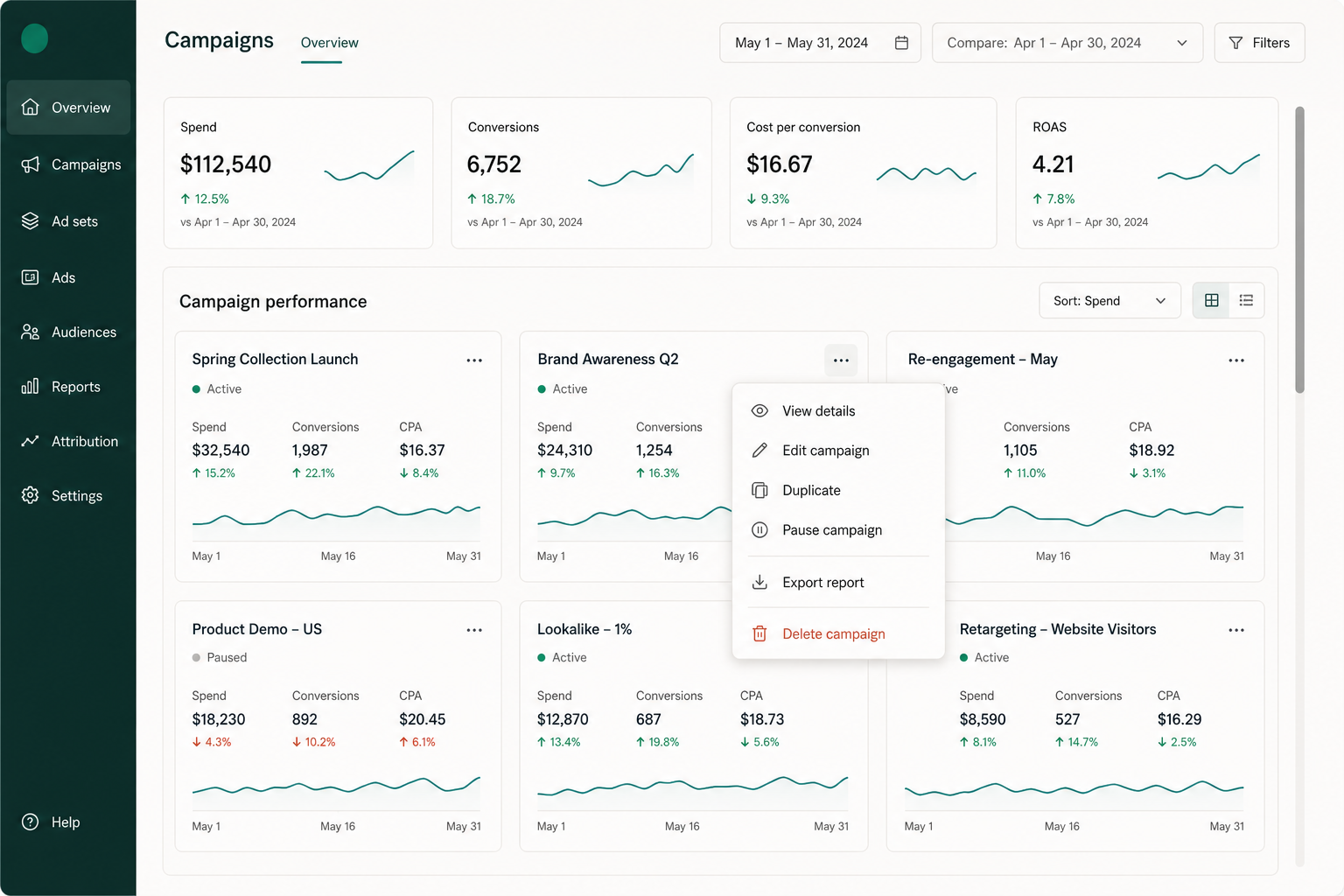
The dropdown belongs to one campaign card, but it can render above the dashboard rather than being clipped by the card’s scroll container.
Conclusion
The key takeaway from this whole article: remember this, and you understand portals.
Portals let you teleport UI in the DOM while keeping it connected in React.
Here’s a thought exercise for you: you have a modal inside a deeply nested component. It needs access to parent state and must overlay the entire app. Why is a portal the perfect solution here? Sit with it before you reach for the code, and provide the answer in the comments.