Canaries vs E2E Tests, Part 1: Two Questions, Not One Answer
Here is a question I get from engineers all the time: which is better, canaries or end-to-end tests?
It is the wrong question. The two are related, but they solve different failure-detection problems, so “which is better?” almost never has an answer. The useful question is what each one is for. Get that straight and the “which” answers itself.
Think of a restaurant
An E2E test is the full rehearsal before you open the doors. Can a customer walk in, order food, pay, and receive the meal? You run the whole thing once, in a controlled setting, to prove the workflow can happen at all.
A canary is different. It is sending a real or synthetic customer through the restaurant every few minutes after you have opened.
So, basically:
E2E tests validate workflows. Canaries monitor live behavior.

What is an E2E test?
E2E means end-to-end. It exercises a user journey across multiple parts of the system, start to finish. A login journey looks like this:
- Open the login page.
- Enter the username and password.
- Submit.
- The backend authenticates the user.
- The dashboard loads.
- Verify the expected content is there.
- Open loginLoad the login page.
- Enter credentialsFill in username and password.
- SubmitSend the login request.
- AuthenticateThe backend checks the credentials.
- Load dashboardShow the signed-in page.
- VerifyAssert the expected content is visible.
In a browser test, that reads, conceptually, like this:
test("user can log in", async ({ page }) => {
  await page.goto("/login");
  await page.getByLabel("Email").fill("user@test.com");
  await page.getByLabel("Password").fill("password");
  await page.getByRole("button", { name: "Sign in" }).click();
  await expect(page.getByText("Dashboard")).toBeVisible();
});
What is a canary?
“Canary” means a few different things in software, so context matters. Here we mean a synthetic canary, sometimes called a canary test: a check that runs on schedule and exercises a real, deployed system. For example, every five minutes, it does this:
- Open the production site.
- Log in using a dummy account.
- Search for a product.
- Open the result.
- Verify the page works.
- Report latency and success or failure.
Conceptually:
async function productSearchCanary() {
  await openProductionSite();
  await login(canaryUser);
  await searchForProduct("coffee");
  await openProductResult();
  await verifyProductPage();
}
A scheduler runs it over and over. The canary runner records latency and success or failure for each run:
- Success
- Success
- Success
- Failure
- Failure
Now you know something changed around 12:15. Nobody had to notice a support ticket. The canary noticed it first.
That is where the name comes from. Miners carried canaries into coal mines as an early warning for dangerous gases. The birds reacted before the humans did. A software canary follows the same idea. Run a small, representative check that fails early, before the system’s trouble reaches your users.
They can be the exact same code
This is where people get confused, so slow down here.
Suppose you have this Playwright test:
test("checkout works", async ({ page }) => {
  await page.goto("/");
  await login(page);
  await addProduct(page);
  await checkout(page);
  await expect(page.getByText("Order confirmed")).toBeVisible();
});
Run it during CI and you call it an E2E test. Run nearly the same workflow every five minutes against production and you call it a canary. The difference is not the test implementation. It is when it runs, where it runs, and why.
The key difference is the question each one asks
Strip away the tooling, and each one is asking a single question:
E2E Test: Does this workflow work in the environment I am testing?
Canary: Is this workflow working in the deployed system right now?
The gap between the above two questions is subtle and is the entire point of this article.
Two lifecycles
- Change code
- Build in CI
- Deploy to test
- Run E2E suite
E2E tests catch regressions the suite covers before they reach production, provided a failing test blocks deployment. Canaries catch problems after deployment and during normal operation, when no one is looking.
Why just E2E tests are not enough
Say your E2E suite passed at 10:00 AM. You deployed at 10:15 AM. Everything was working at that point.
At 2:00 PM, one of the services you depend on has an outage. Your code did not change, and your tests did not suddenly become wrong. But prod is broken.
- ✓ DeployedJourney works
- ✓ WorkingSame release
- × Journey failsDependency outage
The CI test finished hours ago. It has nothing to say about 2:00 PM. A canary running every few minutes can catch it if the outage breaks the journey it checks.
Why just canaries are not enough
Now reverse the situation. A developer makes a change and introduces a regression.
Without E2E tests: merge → deploy → prod breaks → canary notices. The canary did its job. But your users were already hitting the broken feature by the time it fired.
With E2E tests: if the suite catches the regression and passing tests are required to deploy, deployment is blocked.
So the two divide the work cleanly:
- E2E tests help prevent bad releases.
- Canaries help detect bad production behavior.
A side-by-side view
| Dimension | E2E Test | Canary |
|---|---|---|
| Primary purpose | Validate functionality | Monitor availability |
| Typical timing | CI/CD | Continuously |
| Environment | Test/Staging | Production or prod-adjacent |
| Failure means | Code may be broken | System is currently unhealthy |
| Prevent bad deploys | Excellent | Usually too late |
| Detect dependency outage | Limited | Excellent |
| Detect infrastructure issues | Limited | Excellent |
| Frequency | PR/build/release | Every few minutes |
| Alerting | Usually build failure | Usually operational alert |
| User journey coverage | Can be broad | Usually a small critical subset |
There are so many ways to fail
A feature, say, login, has many failure paths. Look at everything it touches:
- Browser.
- Frontend.
- API Gateway.
- Auth Service.
- Database.
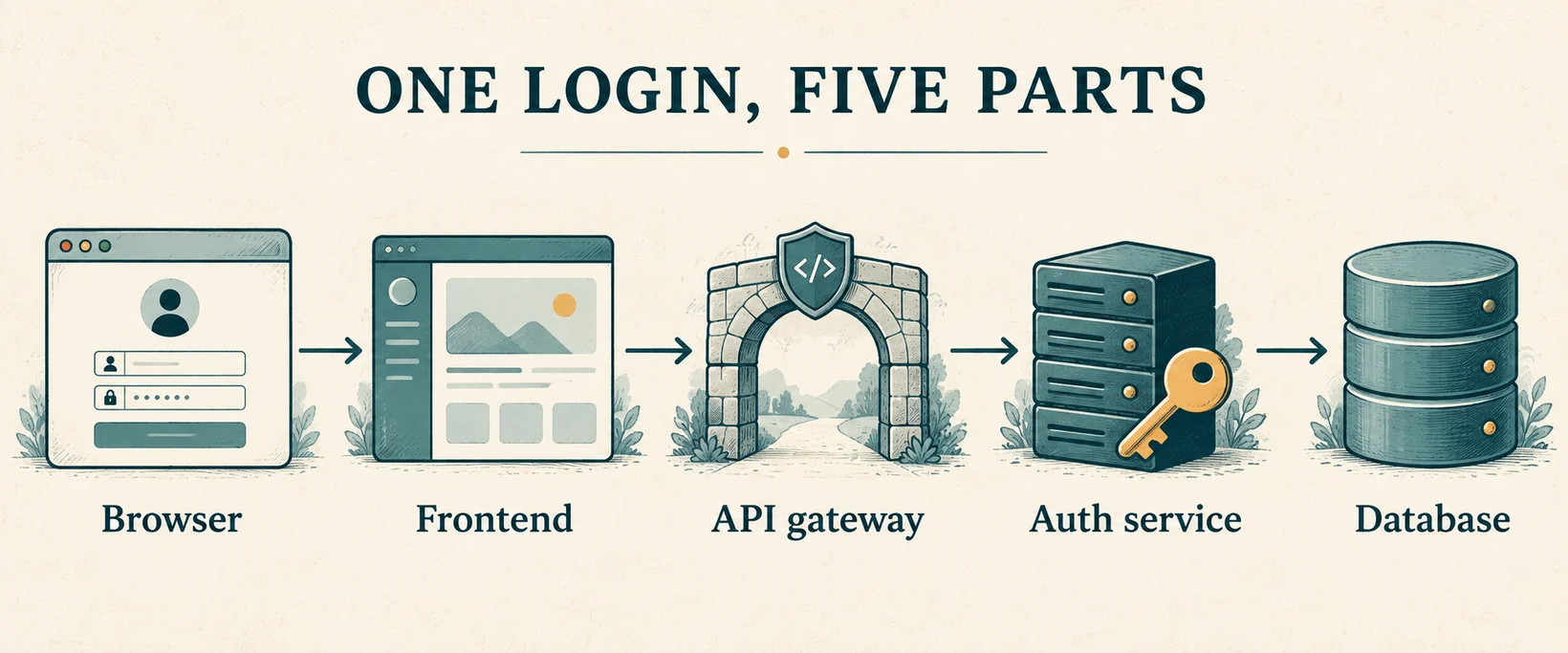
Your E2E tests run before deployment, the login tests go green, and that establishes one thing: our current build can complete login. But production can still fail for reasons your build knew nothing about:
- Auth service outage
- DNS issues
- Bad prod config
- Database outage
- Network issues, etc.
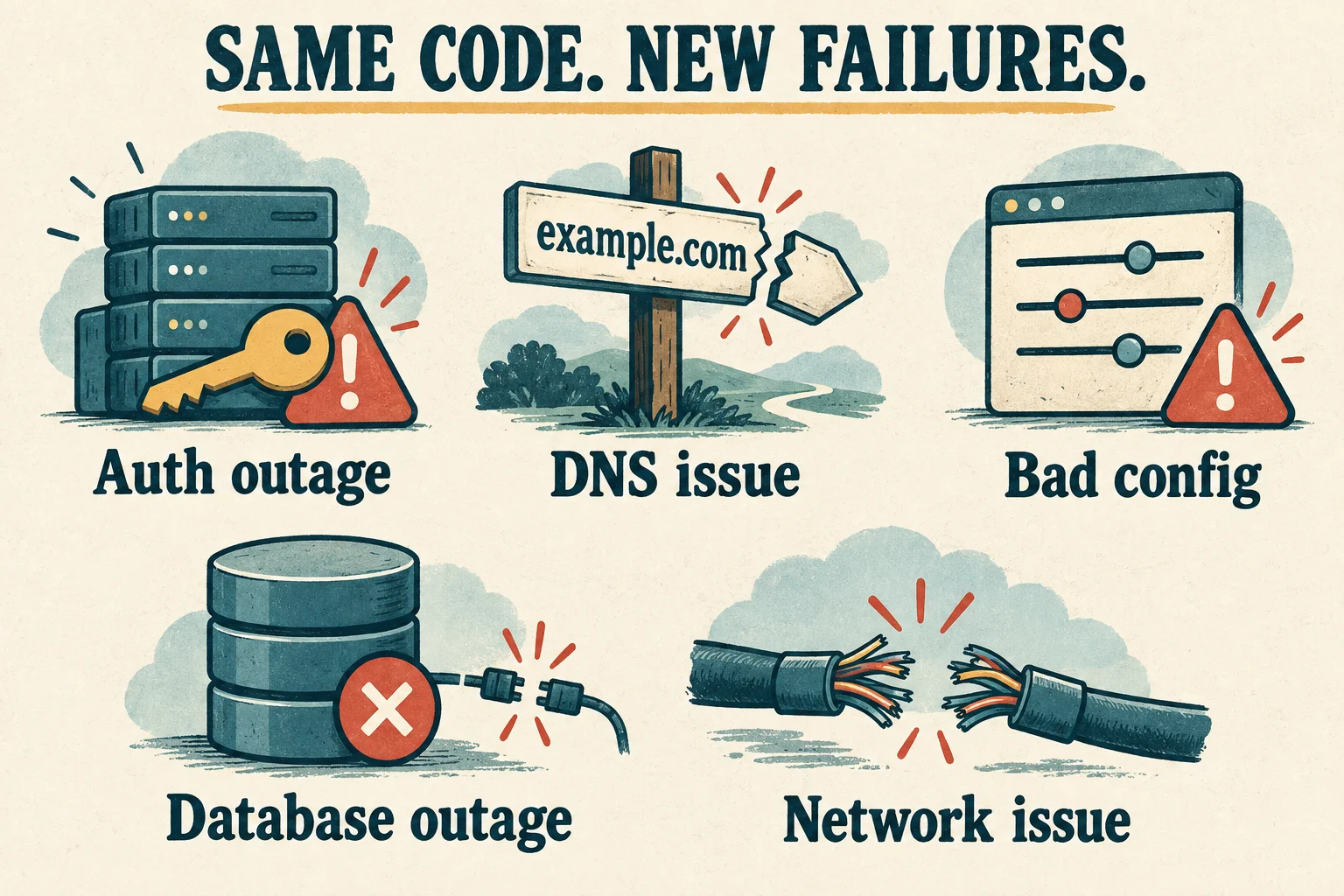
A production canary can catch these when they affect its checks. But it only sees the journey, account, and location it runs with. A passing login check in one region says nothing about checkout in another.
Why canaries are so powerful
A canary does not care why the system broke. It asks a brutally simple question: can the customer still do what they intended to do? That matters because infrastructure monitoring can lie by omission. You can be staring at a dashboard like this:
- CPU✓ Healthy
- Memory✓ Healthy
- Server✓ Healthy
- Database✓ Healthy
An expired OAuth configuration broke the actual user journey while every box you were watching stayed green. A canary that checks this login flow can catch that.
What about health checks?
A health endpoint might return this:
What that means depends on what it checks. A liveness check asks “Is the process alive?” A readiness check asks “Can it serve traffic?” and may check dependencies too.
A canary can check a single endpoint or a whole journey. The journey canaries we are discussing ask “Can a user log in, search, and submit an order?” A healthy endpoint alone does not answer that.
The car dashboard
One more picture, because it holds all the layers at once. Think about a car.
- A basic health check tells you the engine is running.
- The component tests confirm the brake and fuel sensors work.
- The E2E test is what you do before selling the car: start it, drive, brake, turn, park.
- The canary is every morning after delivery, taking a test car around the block to ask if the whole thing still works.
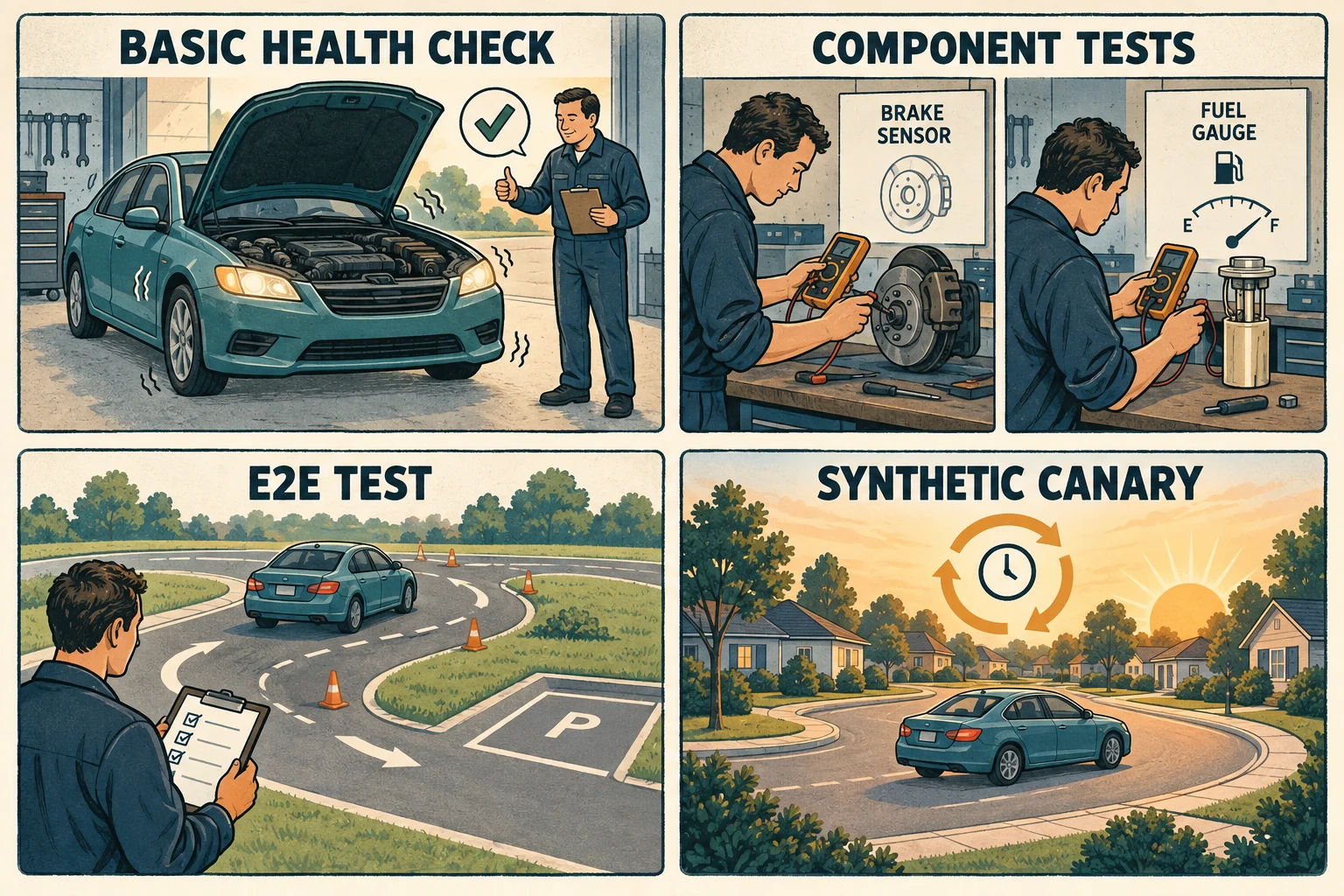
Different layers, different questions. None of them replaces the others.
That is the distinction to carry with you: E2E tests answer “Does it work?” and canaries answer “Is it working?” In Part 2, we get practical: what a canary should and should not test, how to run one without paging your on-call at 2 AM over network noise, where all of this fits alongside the test pyramid and real-user monitoring, and how to decide, for any given workflow, which tool it belongs to.